上一篇介紹到了AngularJS中的Module,這篇接著要提到另外一個很重要的元素: Controller
Controller是AngularJS中實際上用來控制許多流程的重要元素, 宣告方式如下:
angular.module('myApp', [])
.controller('AppController', [function() {
    var self= this;
    self.name = 'I'm a controller.';
}]);
可以看到Controller是直接掛在module底下的, 透過.controller語法來宣告
第一個參數是這支Controller的名稱,
第二個參數是一個字串陣列,裡面可放此Controller相依的dependencies,
而陣列中的最後一個元素則保留給此Controller真正的函式內容
在這邊的例子則是一個沒有任何dependency的Controller
另外, 若Controller中需要帶有其他的dependency, 可宣告如下:
var App = angular.module('myApp',['ui.bootstrap', 'ngResource']);//in some file

App.controller('AppController', ['$log', '$location', function($log, $location) {
    var self= this;
    self.name = 'I'm a controller with some dependencies';
    self.sayHello = function(){alert('say hello');}
    $log.log('I am starting');
    $location.path("/newpath")
}]);
在這個例子中我們可以看到這支Controller引入了兩個AngularJS內建的Service做為Dependency
如此一來我們將可以在Controller中使用這些Service
那麼,在宣告完Controller後,該怎麼使用它呢?
底下透過一個簡單的例子來說明:
index.html
<html ng-app="myApp">
  <head>
    <title>Controller Demo</title>
  </head>
  <body ng-controller="AppController as ctrl">

    <label>Name :</label><input type="text" ng-model="ctrl.name" placeholder="Enter your name"/><br/><br/>

    <span ng-bind="ctrl.message"></span> <span ng-bind="ctrl.name"></span><br/><br/>

    <button ng-click="ctrl.changeMessage()"> Change Message </button>
    <button ng-click="ctrl.resetMessage()"> Reset Message </button>

    <script src="https://ajax.googleapis.com/ajax/libs/angularjs/1.4.4/angular.js">
    </script>
  </body>
</html>
而AngularJS的內容如下:
<script>
  angular.module('myApp', [])
  .controller('AppController', [function() {
      var self = this;
      self.name='';
      self.message= 'Hello';
      self.changeMessage = function() {
          self.message = 'Bye';
      };
      self.resetMessage = function() {
          self.message = 'Hello';
      };
  }]);
</script>
這邊有幾個地方需要注意:
1. ng-app用來宣告AngularJS影響的範圍(scope)
<html ng-app="myApp">
這邊表示整個html都會讓AngularJS的myApp module來控制
2. 用controllerAs語法來引入特定的Controller
<body ng-controller="AppController as ctrl">
這邊表示將AppController這支Controller實體化, 並將其命名為ctrl
往後我們就可以用ctrl.xxx的方式來使用這個Controller實體內的內容, 跟以往使用$scope的方式相比
這種方式可以更明確的區分出目前在程式內的控制動作是由哪支Controller來控制
(尤其是在巢狀或是同時有多支Controller時, 這種寫法的好處更為明顯)
3. 使用ng-click來執行Controller內的函式
    <button ng-click="ctrl.changeMessage()"> Change Message </button>
    <button ng-click="ctrl.resetMessage()"> Reset Message </button>
這邊表示當我們按下Change Message這個按鈕時, 程式就會去執行AppController裡的changeMessage()函式
而當我們按下Reset Message按鈕時, 程式就會去執行AppController裡的resetMessage()函式
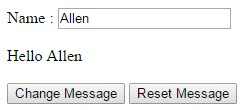
執行結果如下:
輸入名字後
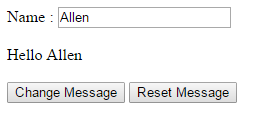
按下Change Message按鈕後
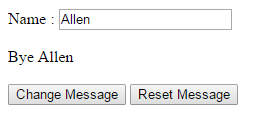
接著按下Reset Message按鈕後
執行上述範例可點擊這邊: https://jsbin.com/voyuwojina/edit
Reference:
1. http://websystique.com/angularjs/angularjs-controllers-explained-with-examples/

請先 登入 以發表留言。